The facts your IT partner and privacy officer will ask for.
For IT and privacy officers
This page answers the questions of the people who vet Bee Flow: where personal data is checked, how content is encrypted, who can sign in and what is logged. With the guard service installed, chat messages are checked for personal data before they reach a model. What is missing is listed too.
Send us your security questionnaire
Plan a call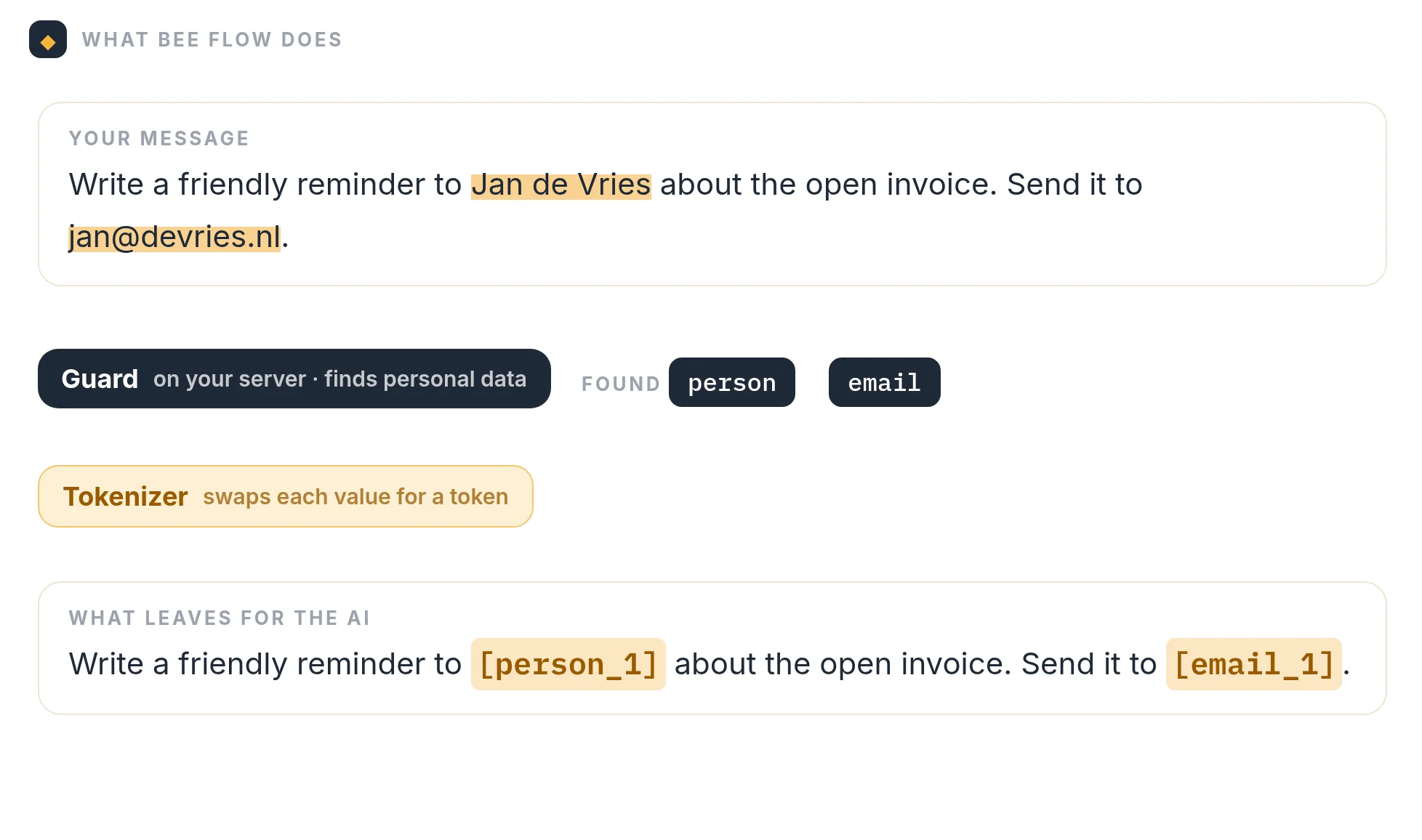
Pick your section
One section per reader, in this order on the page.
For the privacy officer
The personal-data filter and what it does not cover, what is kept and for how long, and the facts for a works council.
For the security officer
How stored content is encrypted, who can still read it, and the filter's settings to try yourself.
For the IT administrator
Sign-in, two-factor, groups and roles, logs, and what is missing: no SAML, SCIM or LDAP.
How the parts connect
A message goes from your apps to the Bee Flow server. With the guard service installed, the Privacy Shield checks it for personal data first. Model choice then picks a model: a local model on your own hardware, or one of nine hosted providers you chose, which receives only what your rules allow. Conversations are stored in PostgreSQL, encrypted with managed keys on every licence, and the Compliance Center (Enterprise) measures the setup.
For the privacy officer
Privacy Shield: what stays, what leaves
Precise on purpose: including the parts that are not covered.
What you decide
Set once for the organisation. Every message: block it, or (from Pro) replace values with placeholders that are restored in the answer. One last check before an outside AI: ask the person, hide the value, or do not send. From Pro, the Web Search Guard also holds personal data back from outbound web search and external tools.
What stays with you
Detection happens inside your environment. The guard runs in a container on CPU, and nothing is sent to a third party to detect personal data. It looks for 21 kinds of personal data, with checksum checks such as BSN, IBAN and Luhn. It exists only when the guard service is installed: a core-only install does no detection. Detection uses machine learning and can miss a value.
What can leave
Only to the provider you chose. The request goes to that model provider, with placeholders or hidden values where your rules say so. If the check is unavailable, a chat message is not sent. Tool results, memory and knowledge base passages pass through unchecked when the guard is down, and the unchecked part of a large attachment is cut off unless you set it to block.
Not covered yet
Eight places send text to the model without the message check: the Swarm level in direct chat, typed messages in template chat, typed messages in the web page builder chat, voice transcripts, the learning coach, the builder chats for automations, App Studio and the CMS, AI chat components inside App Studio apps, and AI on publicly shared and previewed web pages.
For the privacy officer
Retention and logs
What is kept, and for how long. The periods are the defaults of the software, and an operator can change the ones that are settings.
Conversations
Kept until the user deletes them, or until the account is removed. There is no automatic retention period for conversations. An incognito chat stores no conversation, title or memory.
Automation runs and calls to apps
Runs of automations are kept step by step for 90 days by default. The operator sets the period. Calls of tools and automations to connected apps are logged with host, company and country, never the content.
The sign-in log
Every sign-in, refusal and change of access, with IP address, method and reason. A failed attempt stores a fingerprint and never what was typed. Kept until the operator sets a period, which is at least 365 days. Exporting the log is itself logged.
Memory and the knowledge search log
Memories follow the retention period you set in the compliance settings, enforced daily. The knowledge search log is off by default. Switched on for a knowledge base, it is kept 30, 90, 180 or 365 days, and people are told in the chat box.
Works council
Usage signals in chat are off by default. Switched on (Enterprise), they are counts that carry no user and no text. The adoption report (Pro) shows pseudonyms by default. Revealing names writes an audit entry first, and without that entry no names are shown. The sign-in log never stores what was typed. Your organisation still owns the DPIA and the consent process with the works council. The article under Read more explains when consent is needed.
For the security officer: how stored content is encrypted
Managed keys are on every licence and new organisations start on them: an organisation root key holds each person's key, so content is encrypted at rest, a password can be reset, and the operator can still read the data. Zero-knowledge (Enterprise) is the stronger option for private chats: only the person's own secret unwraps the key, with no master key. Even then, chats shared into a project, meeting transcripts and memories stay readable to the operator, and knowledge base documents are not encrypted by the app. TLS ends at the reverse proxy you run.
Try the Privacy Shield
Open the settings and choose what happens to personal data. Compare the actions.
Try the Privacy Shield
Sample data. Nothing you do here is saved.
For the IT administrator
Sign-in, roles and logs
Who gets in, who did what, and what is missing.
Sign-in
Sign-in with Microsoft Entra ID or Google (OpenID Connect, from Starter) or with Nextcloud (Free). Two-factor authentication with an authenticator app and recovery codes, or with a security key. An organisation can require it for everyone.
Groups and roles
Groups are made by hand, or follow Microsoft Entra ID (on demand, or on a schedule once you switch that on) and Nextcloud. Six built-in roles, including Data Protection Officer and ISMS internal auditor. An organisation's administrator cannot change instance-wide settings or reach another organisation on the same server.
Logs
Every call of a tool or an automation to a connected app is logged with host, company, country, status and duration, without content, on every licence. The report on those calls is part of Advanced monitoring (Pro), and calls to AI models are not on it. The sign-in log viewer and its export are part of the Compliance Center (Enterprise).
What is missing
No SAML, SCIM or LDAP, and no push of logs to a SIEM. If SAML is a hard requirement, Bee Flow does not fit today.
Compliance, measured instead of asked
The Compliance Center (Enterprise, generally available) runs 84 readiness checks across 10 frameworks, including GDPR, ISO 27001 and the AI Act: 60 automated, 14 hybrid and 10 attested. Each one reads the configuration of your own install and tells you how to fix what fails. Readiness checks, not a certificate.
What we do not claim
We hold no ISO 27001 or SOC 2 certificate. There is no SAML, SCIM or LDAP. Sign-in works with Microsoft, Google or Nextcloud. Encryption does not cover everything. Of an attachment, the extracted text is stored encrypted. Of a meeting transcript, three fields are not covered: action items, decisions and questions. Knowledge base documents are not encrypted by the app. Reranking of knowledge passages runs on your own server by default. When an administrator configures a reranker at a provider, the passages go to that provider. Conversations are not deleted automatically. They stay until the user or an account removal deletes them. For Bee Flow Cloud there is a processing agreement, which you can request from us at info@beeflow.nl.
FAQ
Questions from IT and privacy officers
Do we need a GPU?
Not for chat on a hosted model, for knowledge search or for the personal-data filter. Those run on CPU. A local language model needs a capable server. Plan about 11 GB of memory for the default install, which includes the filter and the classifier, or 4 GB for a core-only install.
Does the model provider see our text?
Yes: the text that was not replaced, unless the model runs on your own hardware. On Pro, personal data that the filter finds is replaced before the text leaves. One switch limits every level to EU-hosted models. Whether a provider keeps the text depends on your contract with that provider.
Is there SAML?
No. Sign-in works with Microsoft Entra ID or Google through OpenID Connect (from Starter), or with Nextcloud. There is no SAML, SCIM or LDAP. If SAML is a hard requirement, Bee Flow does not fit today.
Open WebUI is free. Why this?
Open WebUI is a good choice for chat on local models, and it is lighter to install. Bee Flow is for the organisation that also needs mail and files under each user's own rights, a personal-data filter, approvals and automations in the same install. Bee Flow has a Free licence too. The comparison page sets the two side by side.
Kubernetes? ARM?
Docker Compose on amd64 is the supported route. For Kubernetes there is a pattern guide, without manifests or a Helm chart. There are no ARM images.
Can another organisation on the same server reach our data?
An organisation's administrator cannot change instance-wide settings or reach another organisation. Routes that take an id are tested automatically: called as a member of another organisation, a route has to refuse. The routes this test does not cover yet are listed in the source, each with a reason.
Is there a processing agreement?
For Bee Flow Cloud, ask us for the processing agreement at info@beeflow.nl. By default, an install on your own server sends us no data. We do not offer a model DPIA.
Read more
The details behind this page, written out.
Where your data goes
Prompts, files and answers step by step, for your own server and for Bee Flow Cloud in the EU.
How the PII filter works under the hood
Patterns with checksums, a model on CPU for names and addresses, a filter that fails closed, and the places it does not cover yet.
A DPIA for AI chat
When an impact assessment is required, what goes in it, and how to keep it proportionate.
A processing agreement for AI chat tools
What a processing agreement for an AI chat tool has to say, and what to check in it.
AI and the works council
When you need consent, and what to bring to the meeting.
What the EU AI Act asks of a small company
AI literacy, transparency and the high-risk list, with the dates as amended in 2026.
What does your security officer need to see?
Tell us what you have to prove and where your data has to live. We answer security questionnaires and show where each answer comes from. Vulnerabilities go to security@beeflow.nl.
Plan a callSend us your security questionnaire