Your own server or Bee Flow Cloud: the same Bee Flow
Bee Flow is an AI workspace for business you can host yourself: install it free on your own server with one command and Docker, or use Bee Flow Cloud in the EU. Self-hosted, the licence is checked offline and by default nothing is sent to Bee Flow.
Install free
Plan a call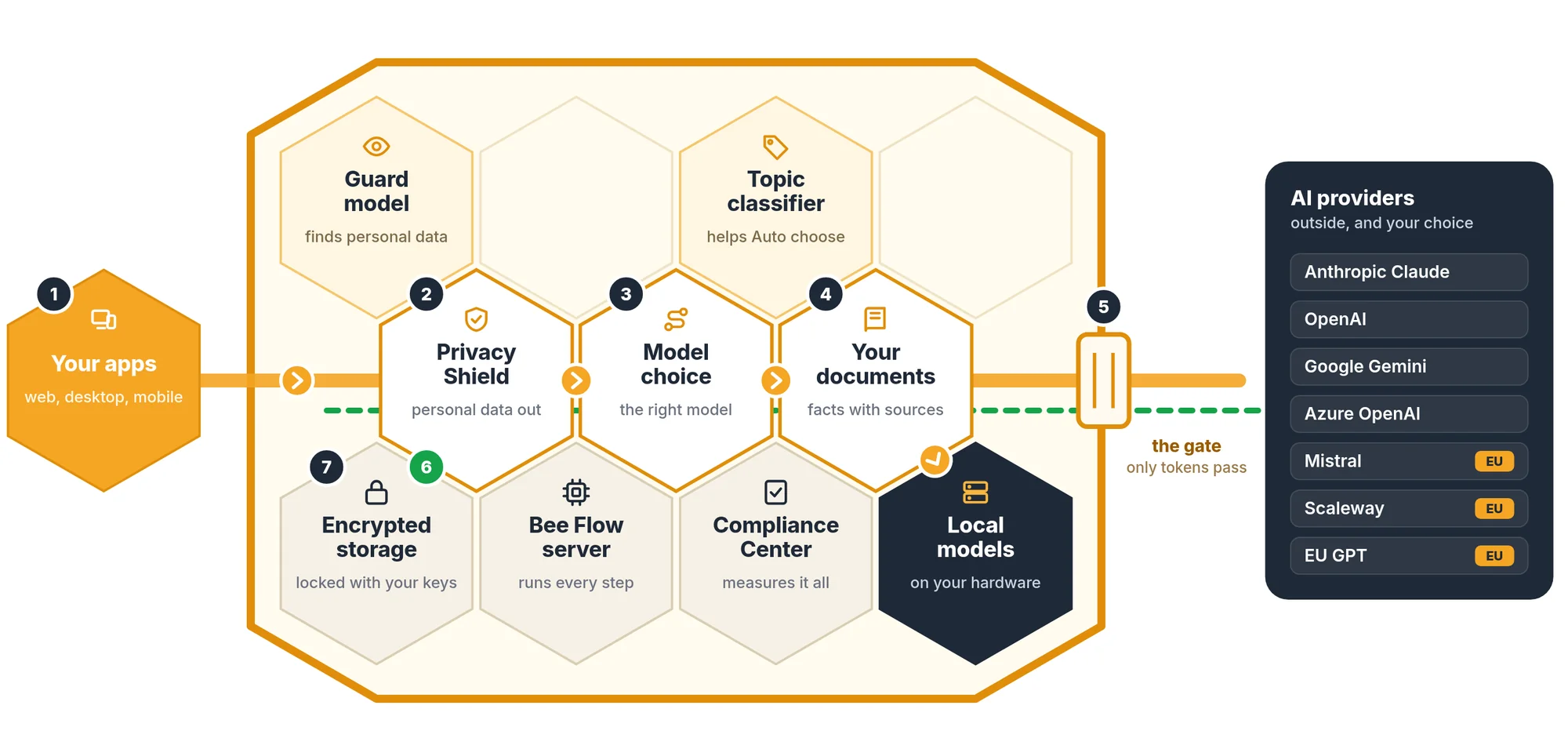
Install with one command
The installer asks a few questions, downloads one release, checks its files against the release checksums and hands over to selfhost.sh. That script pulls the public images, generates the secrets on your machine, waits for the health check and prints your URL and admin password.
No call home by default
By default, a self-hosted install does not report to us, which is the practical side of digital autonomy and digital sovereignty. Each point below can be checked in the source and the documentation.
The licence is checked offline
Starter, Pro and Enterprise use a signed key that your server verifies by itself, without contacting Bee Flow. Free needs no key.
Nothing is sent to Bee Flow by default
By default, a self-hosted install sends no usage data to us. Only an administrator can switch on licence refresh or the module Hub. Metrics and tracing stay off until you point them at your own collector.
It keeps running without internet
An install pulls its images from a registry, so installing and updating need a connection. After that it keeps running without one. A hosted AI model needs internet. A model on your own hardware does not.
Your own server or Bee Flow Cloud
The same product either way. What differs is who runs it, and who can reach the data.
| Your own server | Bee Flow Cloud | |
|---|---|---|
| Who runs it | You or your IT partner, with Docker Compose. | Bee Flow, in the EU. |
| Who can read your data | You are the operator. Whoever runs the server can read data that is not zero-knowledge encrypted. | Bee Flow runs the server and can reach data that is not zero-knowledge encrypted. The processing agreement, which you can request from us, binds that access. |
| Licence key | Free needs none. A paid licence uses a signed key that your server checks offline. | Arranged with us. |
| Updates | Run bash beeflow-install.sh update, or ./selfhost.sh --upgrade, when you choose. | Handled for you. |
| Models on your own network | Yes, through the self-hosted runtimes. | Ask us what fits your setup. |
| Backups | Yours: PostgreSQL and object storage. | Part of the Bee Flow Cloud agreement. |
| Contact with Bee Flow | By default nothing is sent to Bee Flow. Once installed, it keeps running without internet. | Not applicable: we run it. |
How the parts connect
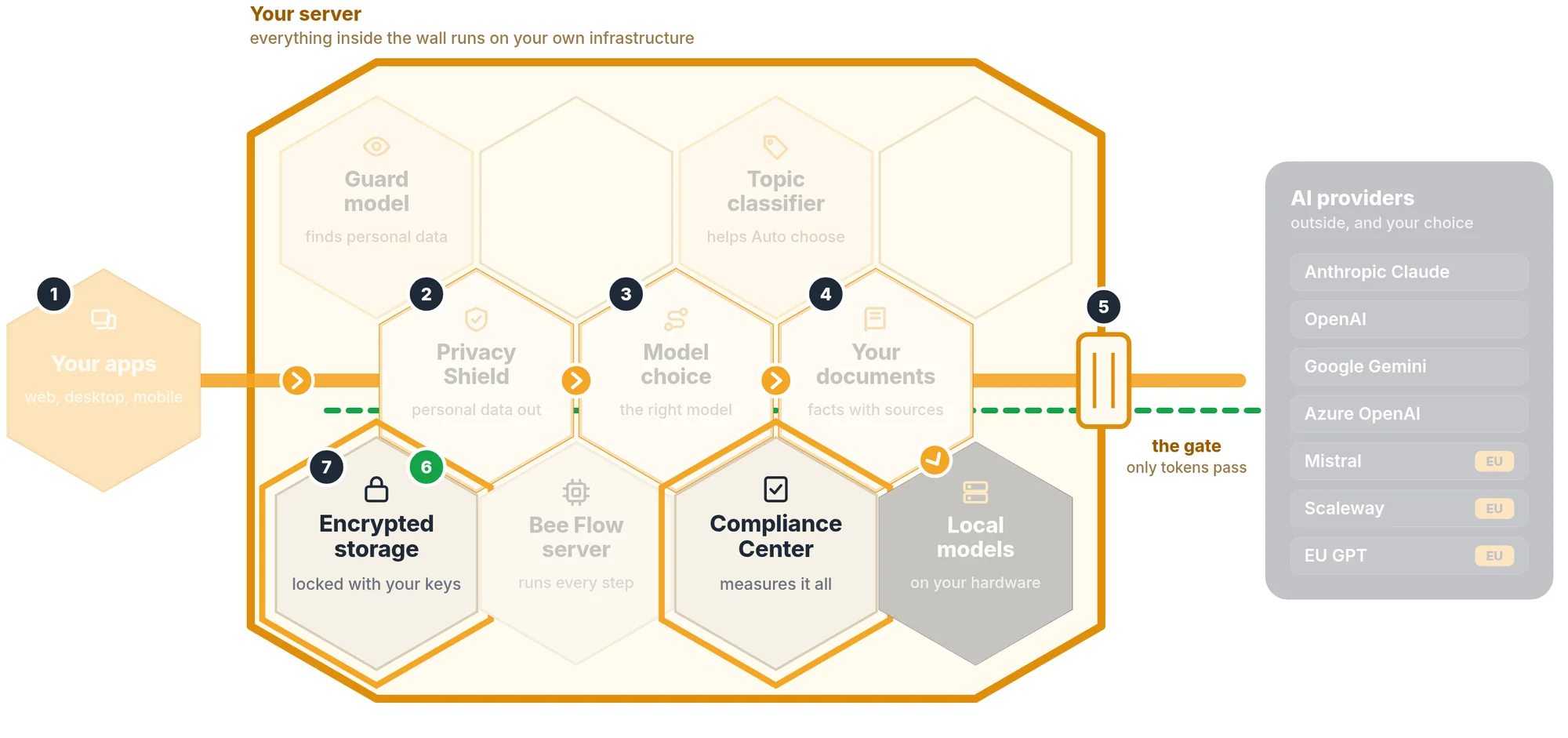
Everything inside the wall runs on your own server: the Bee Flow server, PostgreSQL with your documents and encrypted storage, the guard service that finds personal data, the topic classifier and, if you want, local models. Only what your rules allow goes through one gate to the hosted AI providers you chose. New organisations start with their content encrypted under managed keys.
What it needs
A Linux host on amd64 with Docker and the Docker Compose plugin, plus the parts below. Plan 4 GB of memory for a core-only install, and about 11 GB for the installer's default, which adds the personal-data filter and the classifier. You need no GPU for chat on a hosted model, for knowledge search or for the filter. The images are published for amd64 only; on an ARM machine they run through emulation, which is fine for a look around and too slow for real use. The core profile starts the database and object storage for you.
PostgreSQL with pgvector
Holds your data, including the vectors behind document search.
S3-compatible object storage
Holds files and attachments. The stack ships RustFS by default.
TLS at your own reverse proxy
Bee Flow sits behind the reverse proxy you run, which terminates TLS.
A guard model for personal data
The guard profile loads a model of about 1.2 GB at start and runs on CPU.
Any model, through one interface
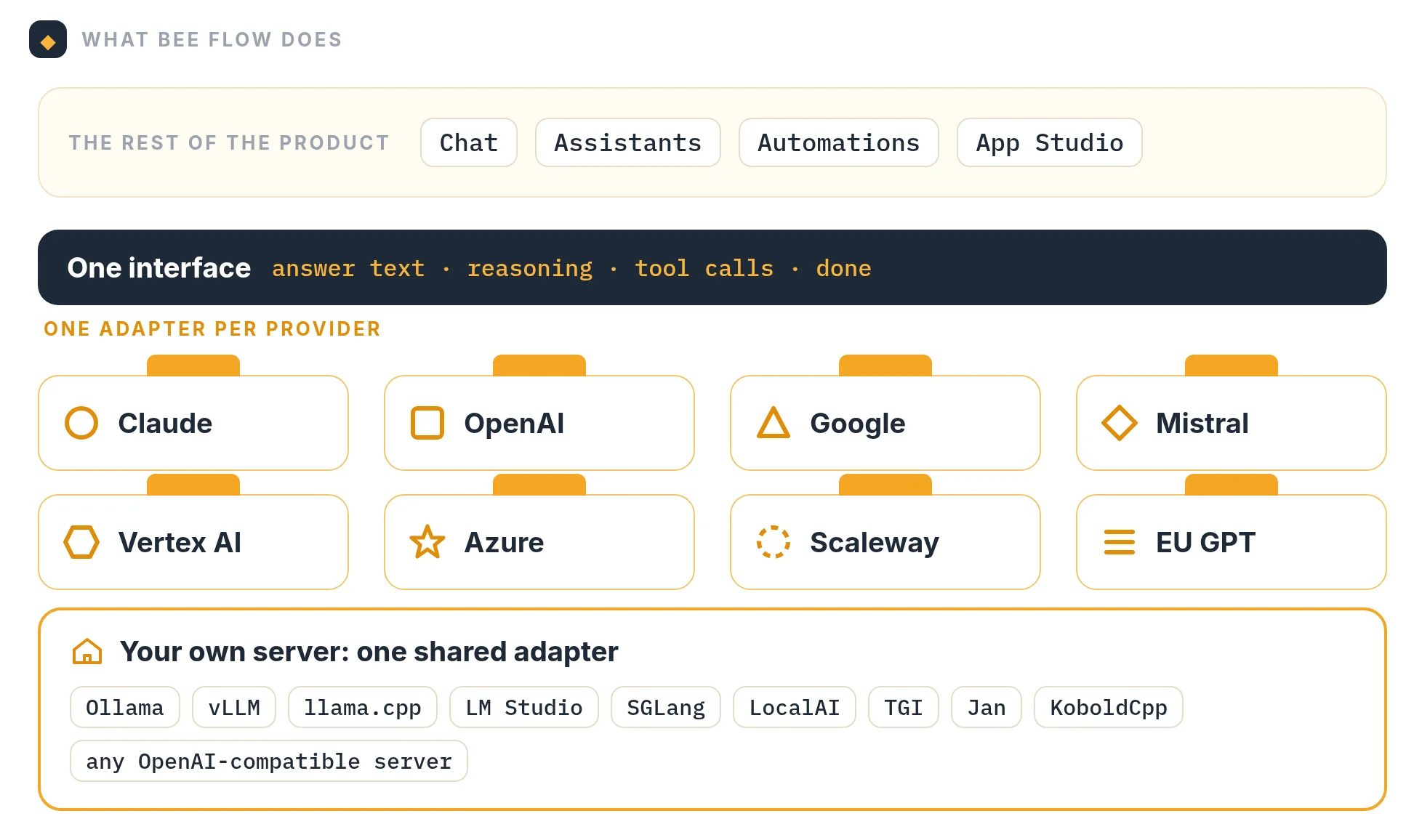
Bee Flow has nine provider adapters: Anthropic Claude, OpenAI, Google Gemini, Google Vertex AI, Azure OpenAI, Mistral, Scaleway Generative APIs, IONOS AI Model Hub and EU GPT. Self-hosted runtimes such as Ollama, vLLM, llama.cpp and LM Studio share one adapter. The rest of the product talks to a single interface, so switching models changes nothing else.
What runs where
Five Compose profiles. ./selfhost.sh starts core only. The installer asks whether to add guard and classify, and proposes yes. Add the rest when you need them.
core
core: the workspace
Server, frontend, PostgreSQL with pgvector and object storage. Chat, knowledge bases and automations run here. ./selfhost.sh starts this by default.
guard
guard: personal data detection
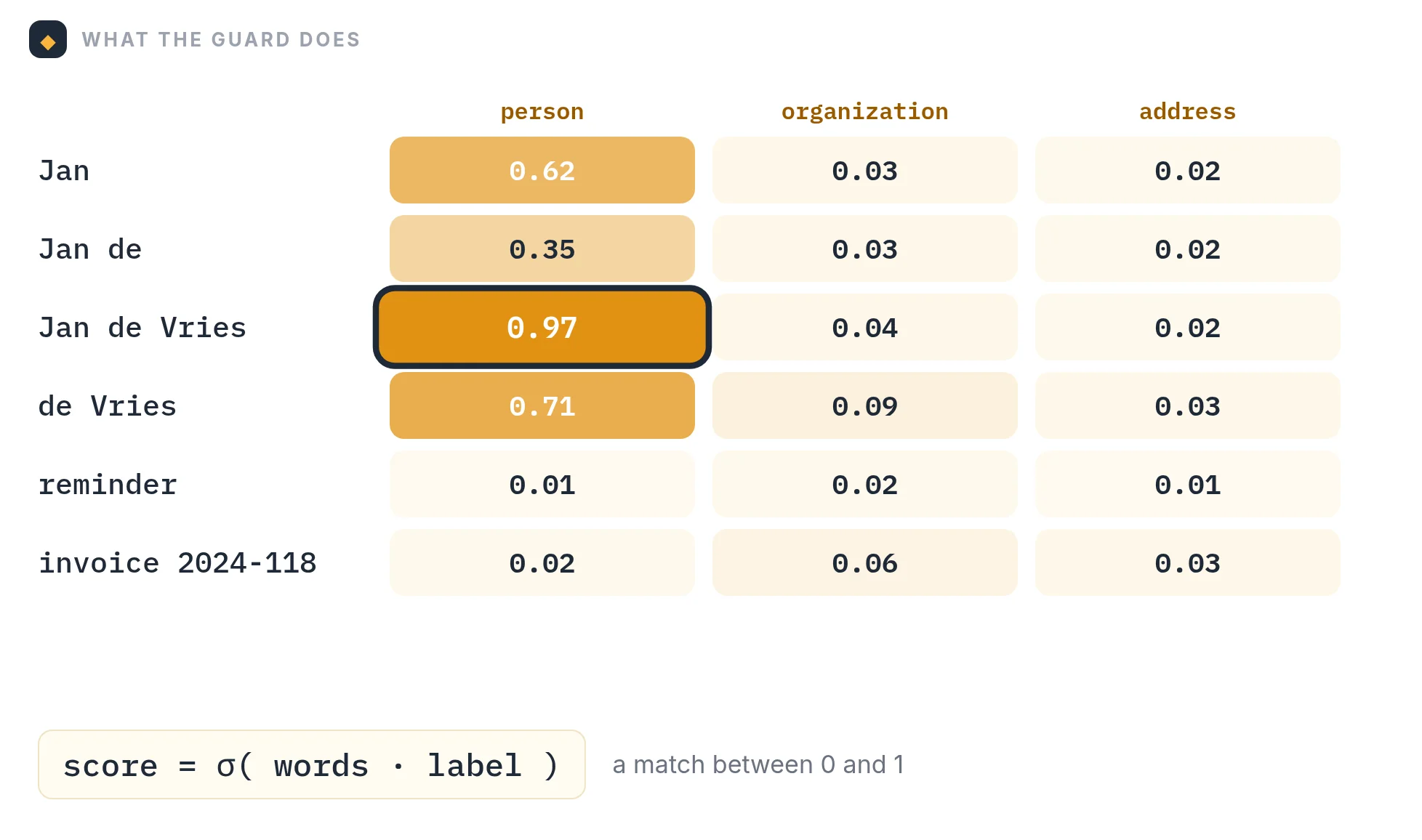
The guard service finds personal data in messages before they leave. Without this profile a core-only install does no detection.
classify
classify: topic detection
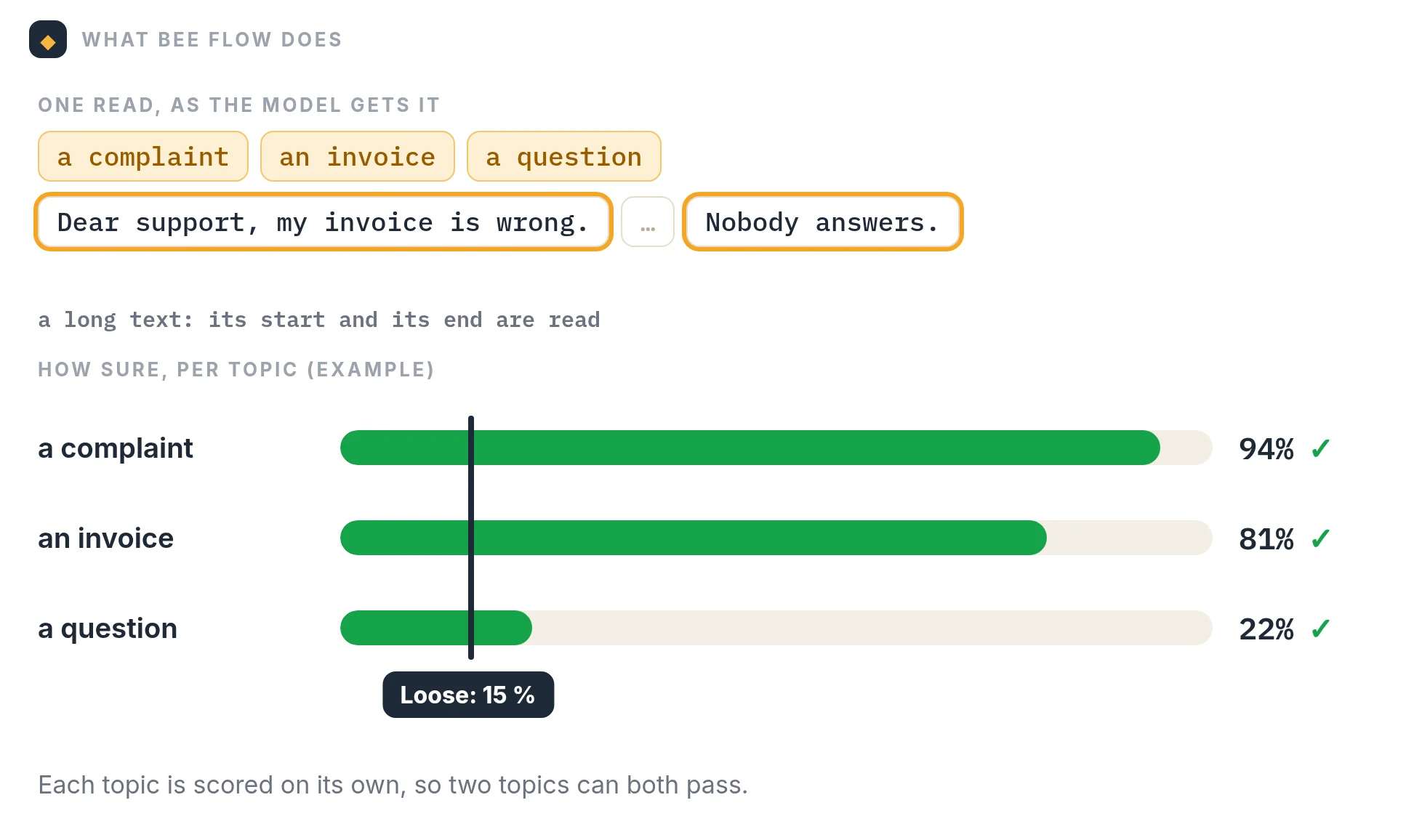
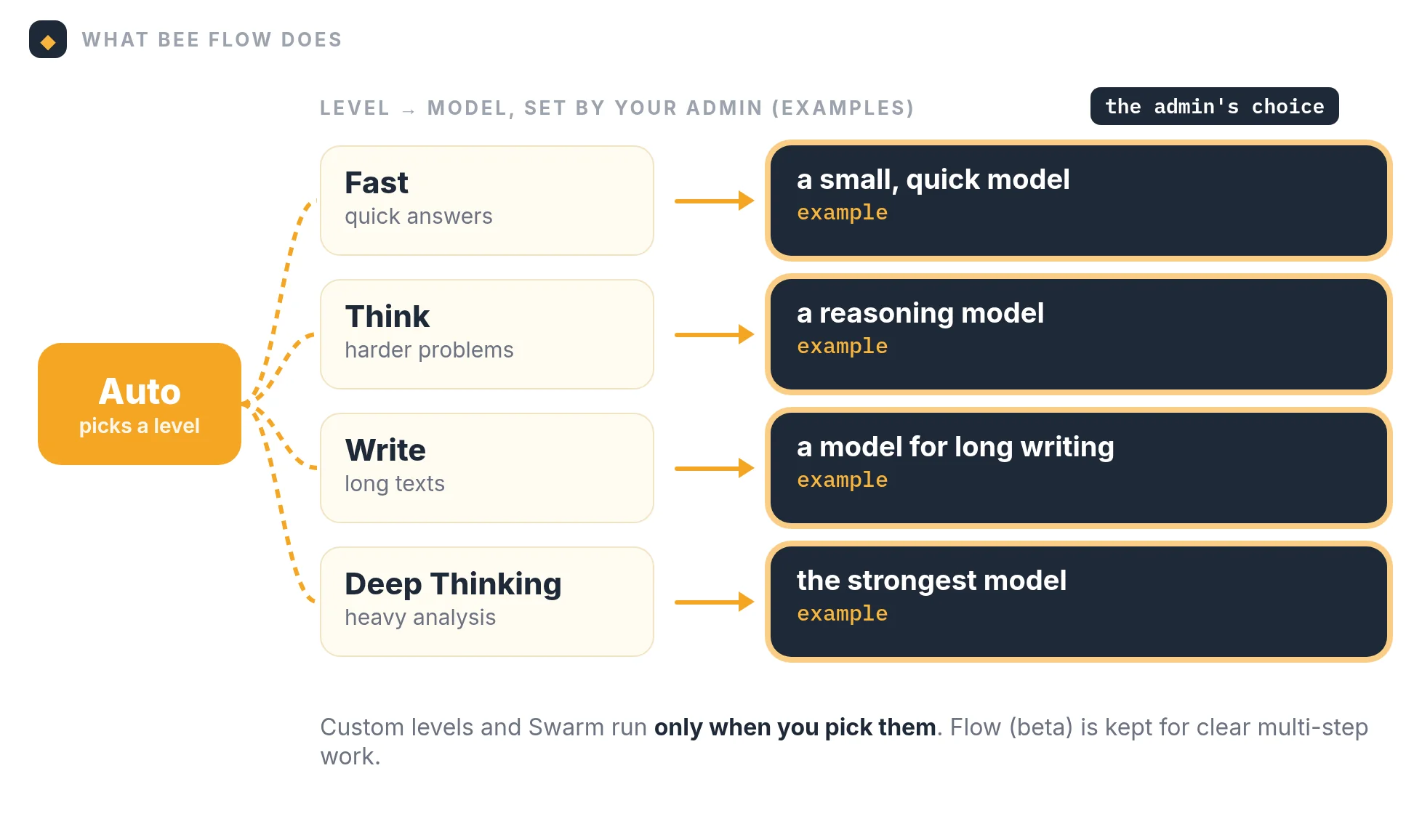
A zero-shot topic classifier that runs on CPU. When the model is set to Auto, it helps pick the model tier for each message, and it powers the 'is about' rule in automation conditions.
local-llm
local-llm: Ollama
Run models on your own hardware with no API keys and no per-token cost. Download a model from the admin settings after the first start.
analytics
analytics: Umami
Adds Umami, a privacy-friendly analytics tool that you host yourself.
Questions IT leads ask
Do we need a licence key?
Not for Free. Starter, Pro and Enterprise use a signed key that your server checks offline.
What if the licence ends?
The install keeps running. Without a valid key it falls back to Free and deletes nothing. Approvals that are waiting can still be decided. New paid steps stop.
Does it need internet access?
To pull the public images, and to reach the hosted AI providers you choose. By default nothing is sent to Bee Flow, and once installed it keeps running without internet.
Do we need a GPU?
No, for chat on a hosted model, for knowledge search and for the personal-data filter. A language model on your own hardware needs a capable server, in practice one with a graphics card.
Does it run on ARM?
The images are published for amd64 only. On an ARM machine they run through emulation, which is fine for a look around and too slow for real use.
Is there SAML?
No. There is no SAML, SCIM or LDAP. People sign in with Microsoft or Google (single sign-on from Starter) or through Nextcloud, and an organisation can require an authenticator app or security key. Groups can follow Entra ID or Nextcloud. If SAML is a hard requirement, Bee Flow does not fit today.
Does it run on Kubernetes?
The images run on Kubernetes, and the documentation has a pattern guide. There is no Helm chart and we publish no manifests. Docker Compose on amd64 is the supported route.
How do updates work?
Run bash beeflow-install.sh update, or set the new image tag and run ./selfhost.sh --upgrade. It pulls the images, recreates the containers, runs the database migrations and checks health. If something fails, it prints the steps to roll back.
Sign-in, roles, retention and encryption, and what is not covered, are on a separate page for IT and privacy officers.
Technical details per readerRead more
Before you choose where it runs.
Running AI on your own server
When it makes sense, what it takes, and the middle road of open models in European data centres.
Where to host an AI workspace in Europe
A European VPS, a hyperscaler region, a sovereign region or your own rack, compared on operation, GPUs, backups and exit.
Sizing a server for a local model
What 10 to 30 people need in memory per quantisation, and when CPU-only will do.
Self-hosting with a local model on Ollama
From a fresh Docker host to a first chat answered by a model on your own hardware.
Bee Flow next to Nextcloud
One app from the Nextcloud App Store puts the assistant inside the Nextcloud you already run.
Bee Flow and Open WebUI compared
Where Open WebUI is the lighter choice, and what Bee Flow adds for an organisation.
Your own server or Bee Flow Cloud: start free, or talk to us first
Install Free in minutes with one command. Or tell us where your data has to live and we will say which option fits.
Install free
Plan a call